
Internet Block
Completely cut off any program's internet access — both inbound and outbound traffic. Eliminates unwanted auto-updates, telemetry reporting, license call-homes, and any form of data leakage from your applications.
Take complete command of your Windows environment. Block any application from accessing the internet or running entirely — with zero background process, zero performance impact.
ProgramBlocker is a powerful Windows utility designed to give you direct, no-nonsense control over which programs can access the internet and which programs can run at all — in just a few clicks, with no technical knowledge required. Whether you want to cut off a game's online connection, stop unwanted software from launching, or completely lock down a specific application, ProgramBlocker puts you in command instantly.
Unlike complex firewall configurations or group policy edits, ProgramBlocker works through a clean, intuitive interface that any user can understand. Select a program, choose your block type, and it's done — the block survives reboots, updates, and everything in between, with absolutely zero background processes running.
💡 Did you know? Many popular programs silently send telemetry data, to verify licenses, or auto-update themselves without ever asking for your permission. ProgramBlocker lets you stop all of that — permanently.
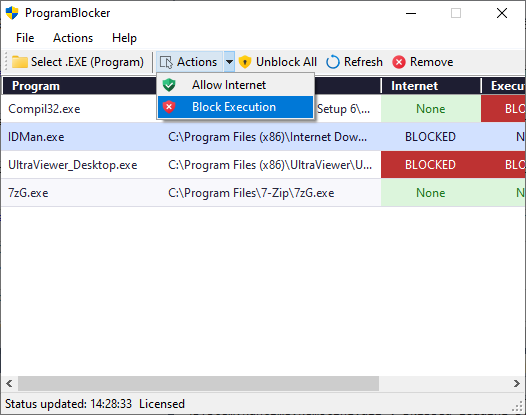
Completely cut off any program's internet access — both inbound and outbound traffic. Eliminates unwanted auto-updates, telemetry reporting, license call-homes, and any form of data leakage from your applications.
Prevent any program from launching at all — it cannot start, cannot run in the background, and cannot be triggered by other software. Ideal for parental control, software lockdowns, and enterprise workstation security.
Once blocks are applied, ProgramBlocker does not need to remain running. There are no background services, no memory usage, and no CPU overhead. Blocks are enforced at the system level and persist indefinitely.
Every block you apply can be removed at any time with a single click. ProgramBlocker maintains a persistent, editable blocklist so you always stay in control — no permanent changes, no registry mess, no risk.
ProgramBlocker uses Windows Firewall rules and execution policies at the system level — not simple host file tricks. This means your blocks are robust, tamper-resistant, and effective even when programs try to bypass them.
Restrict children's access to specific games, social media apps, or any software you choose — without complicated parental control suites. Block internet access while still allowing offline use, or block execution entirely.
Unlike simple host file edits or superficial app blockers, ProgramBlocker integrates directly with Windows' own system-level filtering mechanisms to ensure that your targeted applications stay blocked — no matter what. The software maintains a clean separation between two distinct block types: Internet Block and Execution Block, giving you granular control that most tools simply don't offer.
For example, you can block a game from accessing its online servers while still allowing it to run in offline mode — great for preventing in-game purchases or online matchmaking without disabling the game entirely. Alternatively, you can lock down an application completely so it cannot run under any circumstances, which is ideal for parental control environments or shared workstations.
Every block is applied immediately upon confirmation and persists through system reboots and application updates. ProgramBlocker maintains a reliable blocklist that survives even when the blocked software attempts to update itself or reinstall. And because all enforcement is handled at the OS level, ProgramBlocker itself doesn't need to run in the background — meaning zero CPU usage, zero memory footprint, and zero performance impact once your blocks are set.
Whether you are a parent managing your children's screen time and app access, an IT administrator securing employee workstations, a developer testing network behavior, or simply a privacy-conscious individual who doesn't want applications reporting back to their servers — ProgramBlocker gives you the control you need, delivered through an interface anyone can use in under a minute.
Supported on: Windows 7, 8, 10, and 11 (32-bit and 64-bit).
Block children's games from accessing online content, prevent social media apps from running during homework hours, and maintain control over screen time without complex parental control software.
Lock down workstations to prevent unauthorized software from running or phoning home. Enforce security policies without managing complex group policies or enterprise firewall rules.
Stop telemetry-heavy applications from sending your usage data back to their servers. Block license verification calls, auto-updaters, and any software you don't trust with your network access.
Force games into offline mode, prevent unwanted background updates during gameplay, or block multiplayer features while keeping single-player functionality fully intact.
| Feature | Trial Version | Licensed — $5.79 |
|---|---|---|
| Block Internet Access | ✓ Unlimited | ✓ Unlimited |
| Block Program Execution | 10 uses only | ✓ Unlimited |
| Priority Email Support | ✗ Not included | ✓ Within 24 hours |
| Lifetime License (One PC) | ✗ Not included | ✓ Lifetime, transferable |
| All Future Minor Updates | ✗ Not included | ✓ Free, forever |
| No Subscription or Recurring Fees | ✗ — | ✓ One-time payment only |
* Trial version allows unlimited internet blocking. The "Block Execution" feature is limited to 10 uses during the trial period. A license is required to unlock unlimited execution blocking.
Have a question before purchasing, experiencing an issue, or need help activating your license? We're here to help. Licensed users receive priority support with responses within 24 hours.
📧 Email: programblocker@gmail.com
Please include your order details or PayPal transaction ID when contacting support for a license-related issue. For general pre-sales questions, feel free to write anytime — we typically respond within 1 business day.